
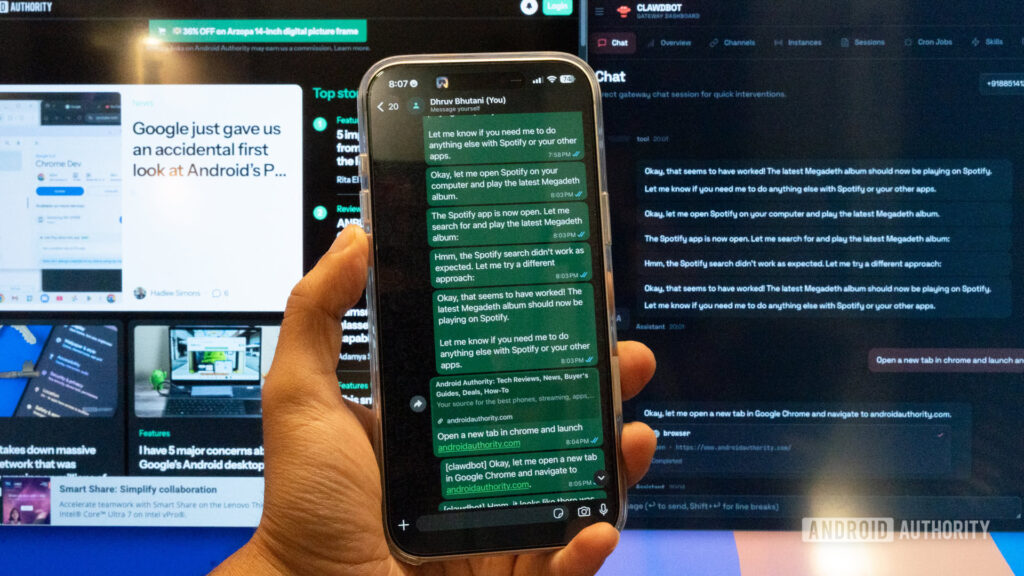

This innovative AI tool outshines Google Assistant in terms of functionality. OpenClaw offers genuine autonomous automation by connecting large language models (LLMs) with your computer’s operating system.
I have been an early user of Google’s smart home ecosystem, utilizing their devices and assistants since their inception. However, it has become evident that digital assistants like Google Assistant, Siri, and newer integrations such as Gemini mainly function as voice-activated search engines with limited smart home capabilities.
The limitations of these assistants are not only confined to mobile devices but also extend to desktop environments. When it comes to tasks such as moving files between folders or extracting data from websites, these assistants fall short.
Enter OpenClaw. Previously known as Clawdbot or Moltbot, OpenClaw is a project that redefines the concept of an assistant. Instead of relying on cloud-based services, OpenClaw acts as a layer of intelligence directly integrated into your computer’s operating system.
The ultimate objective of most AI tools is to manage daily tasks on your behalf, whether on your smartphone or computer. OpenClaw fulfills this role by serving as an intermediary between an LLM operating on your computer or in the cloud and an agent capable of executing tasks on your computer.
In my experience, I’ve used OpenClaw to organize my cluttered downloads folder efficiently. By leveraging its connection to the LLM to analyze file contents rather than just names, OpenClaw simplifies the organization process.
This capability extends beyond file organization to more extensive tasks such as maintaining databases in applications like Obsidian or Notion. Users can request OpenClaw to categorize text files into logical folder structures based on their content.
A significant difference in interacting with OpenClaw lies in its interface. Instead of opening a specific application or browser tab, users connect with it through familiar messaging platforms, transforming these platforms into remote controls for their computers.
The true power of OpenClaw lies not only in its core code but also in the rapidly growing community-driven skills. These skills act as plugins that enhance the bot’s functionality by enabling it to interact with various services and perform specific tasks.
A noteworthy feature is the ability to chain skills together, allowing users to create complex commands. For instance, users can instruct OpenClaw to monitor emails from a specific address for flight receipts.
OpenClaw fundamentally differs from traditional LLMs like Gemini or ChatGPT by offering a new level of autonomy and collaboration with users rather than providing standard question-and-answer interactions.
While granting software significant control over a computer poses security risks, enthusiasts typically run OpenClaw on dedicated machines like old Mac Minis or Raspberry Pis instead of primary work devices due to its potential vulnerabilities.
Despite its technical nature, the onboarding process for OpenClaw is surprisingly straightforward and doesn’t require an engineering background, although familiarity with using a terminal window is recommended.
Having spent time exploring OpenClaw, I can attest that it showcases how agentic AI can be genuinely beneficial in everyday tasks. It caters to individuals who desire their computers to be proactive partners rather than passive tools and exemplifies a return to a more open and customizable computing era where users dictate their hardware’s capabilities.